Local-first · Apple Silicon · Open source
MachBoost
Turn one powerful Mac into a private AI endpoint for your team, with resident models, repository-aware answers, and measured acceleration.
Unsigned community preview · arm64 · macOS 14+
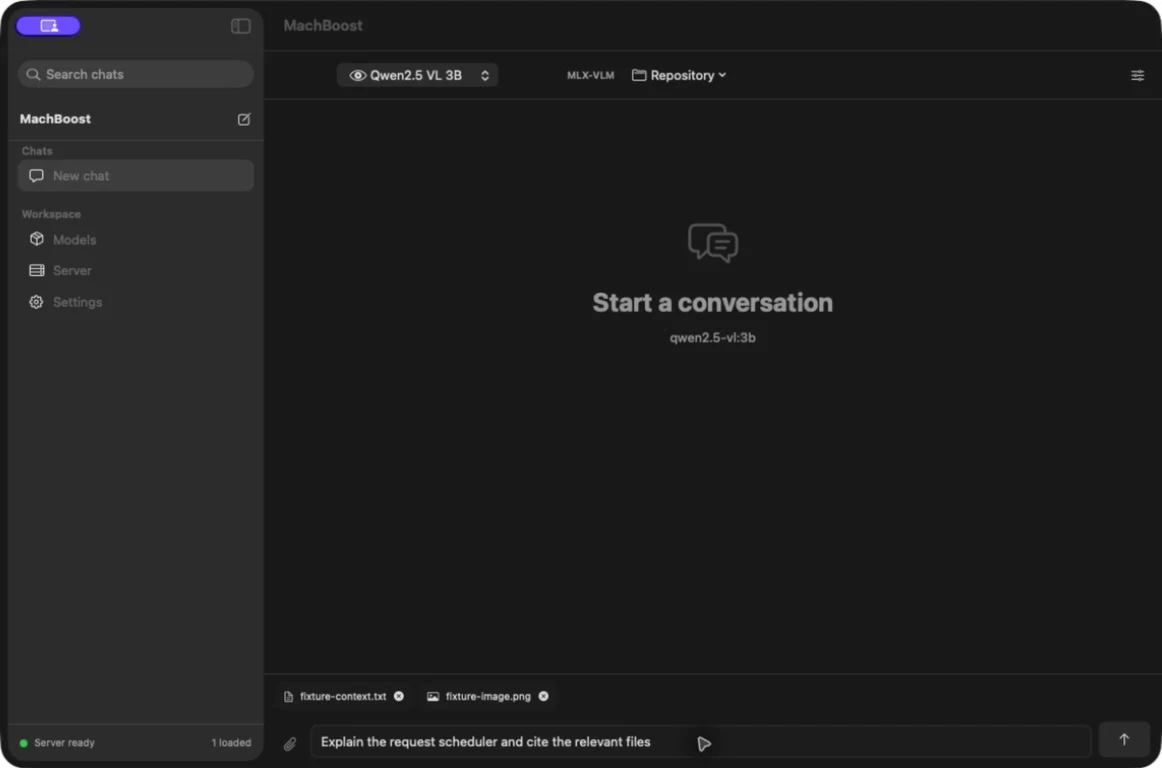
Native control surface
Your Mac becomes the inference server.
Chat locally, keep models resident, attach persistent context, index a codebase, or serve the same runtime through familiar APIs.
-
Repository intelligence
Index tracked source once, retrieve focused evidence per question, and keep the reusable repository prefix stable.
-
Resident serving
Keep multiple models warm behind one bounded, tenant-fair gateway with cancellation, employee limits, and resource metrics.
-
Text and vision
Run MLX and MLX-VLM models with persistent files and images that remain attached until you remove them.
-
Drop-in APIs
Connect existing tools through OpenAI- and Ollama-compatible endpoints or use the Python client directly.
Team Gateway
One Mac. Your team's coding agents.
Give each employee a scoped key and point Cline, Kilo Code, or another OpenAI-compatible client at the same private endpoint. Models stay resident while MachBoost enforces model access, concurrency, request rates, and fair queueing between employees.
Team Gateway guide- Identity
- Scoped keys
- Admission
- Tenant-fair
- Protocols
- OpenAI + Ollama
- Tools
- Parallel calls
export OPENAI_BASE_URL="http://TEAM-MAC:11435/v1"
export OPENAI_API_KEY="mbk_employee_key"
Govern access
Model allowlists, scoped keys, per-minute limits, and revocation from the native app.
Share repository context
Register a codebase once, retrieve bounded evidence, and keep reusable prefixes stable.
Inspect and evaluate
Choose metadata, redacted, full, or no traces, then evaluate selected requests locally.
Measured, not hand-waved
Speed where context repeats.
MachBoost accelerates exact reusable prefixes. It does not claim every first request or every unique prompt becomes faster.
| Workload | Model | Native | MachBoost | Median | Validation |
|---|---|---|---|---|---|
| Repository context | Qwen2.5 3B 4-bit | 3.144s | 1.024s | 3.02× | 6/6 exact tokens |
| Repository context | Qwen2.5 7B 4-bit | 6.587s | 1.998s | 3.28× | 6/6 exact tokens |
| Different repo questions | Qwen2.5 7B 4-bit | Five distinct questions | 3.23× | Exact tokens | |
| Repeated-image matrix | Six Qwen models | 72 paired requests | 13.51× | 100% expected answers | |
| First-view control | Qwen3-VL | No reusable prefix | 0.99× | No acceleration claim | |
Repository results use the same loaded MLX model, weights, prompts, and tokenization. Median prompt length was 10,405 tokens; 7,901 tokens were reused. The visual figure is the median of six model-level paired medians.
How it works
Reuse the expensive part safely.
-
01
Load once
The resident server keeps selected MLX models in unified memory.
-
02
Build stable context
Repository maps, documents, images, and chat prefixes are organized so exact reusable regions remain identifiable.
-
03
Restore model state
Compatible MLX caches skip repeated prefill work while preserving the same target-model generation path.
-
04
Retrieve what changed
Focused evidence and the new question are evaluated normally, with citations returned to the client.
Community preview
Download. Drag. Approve.
The preview DMG is free and ad-hoc signed. Apple has not notarized it, so macOS asks you to approve the app manually after download. Community updates open GitHub Releases and may require the same approval again.
-
1
Download the DMG
Apple Silicon and macOS 14 or newer are required.
-
2
Drag MachBoost to Applications
The bundled runtime means no Homebrew or Python setup.
-
3
Attempt the first launch
macOS will block the unidentified community build initially.
-
4
Choose Open Anyway
Go to System Settings → Privacy & Security, then approve MachBoost. Later launches of that installed version open normally.
Use your existing tools
One local endpoint.
The app and CLI speak through the same daemon. Point OpenAI-compatible clients at MachBoost or call the Ollama-style routes directly. Loopback works only on the host Mac; authenticated LAN mode displays a reachable address and token for teammates on the same private network.
from openai import OpenAI

client = OpenAI(
    # Same Mac. For teammates, use the LAN URL shown in Server > Developer.
    base_url="http://127.0.0.1:11435/v1",
    api_key="machboost"
)

response = client.chat.completions.create(
    model="qwen2.5:3b",
    messages=[{"role": "user", "content": "Explain this repo"}]
)machboost serve
machboost pull qwen2.5:3b
machboost run qwen2.5:3b